Hello,
You may have seen that 1Password, one of the most trusted password managers there is, announced a security incident on 25 November. When a company whose whole job is protecting secrets has a security incident like this, it is significant news for the rest of us. The last month has brought several very high-profile cyber security incidents, and this is one of the most alarming.
What happened
On 19 November, 1Password began investigating signs that an attacker had got into an employee's corporate GitHub account. With that access, the attacker copied source code from private repositories, pushed malicious code to backend services and downloaded a limited amount of customer account information, including names and email addresses. 1Password says no vaults, passwords, secrets or the keys that protect them were accessed, and its apps are unaffected. It hasn't yet said how the employee's account was compromised.
You can read 1Password's update, and good coverage from The Hacker News and TechCrunch. Ayman Al-Abdullah has also written clear, practical guidance that we'd recommend reading.
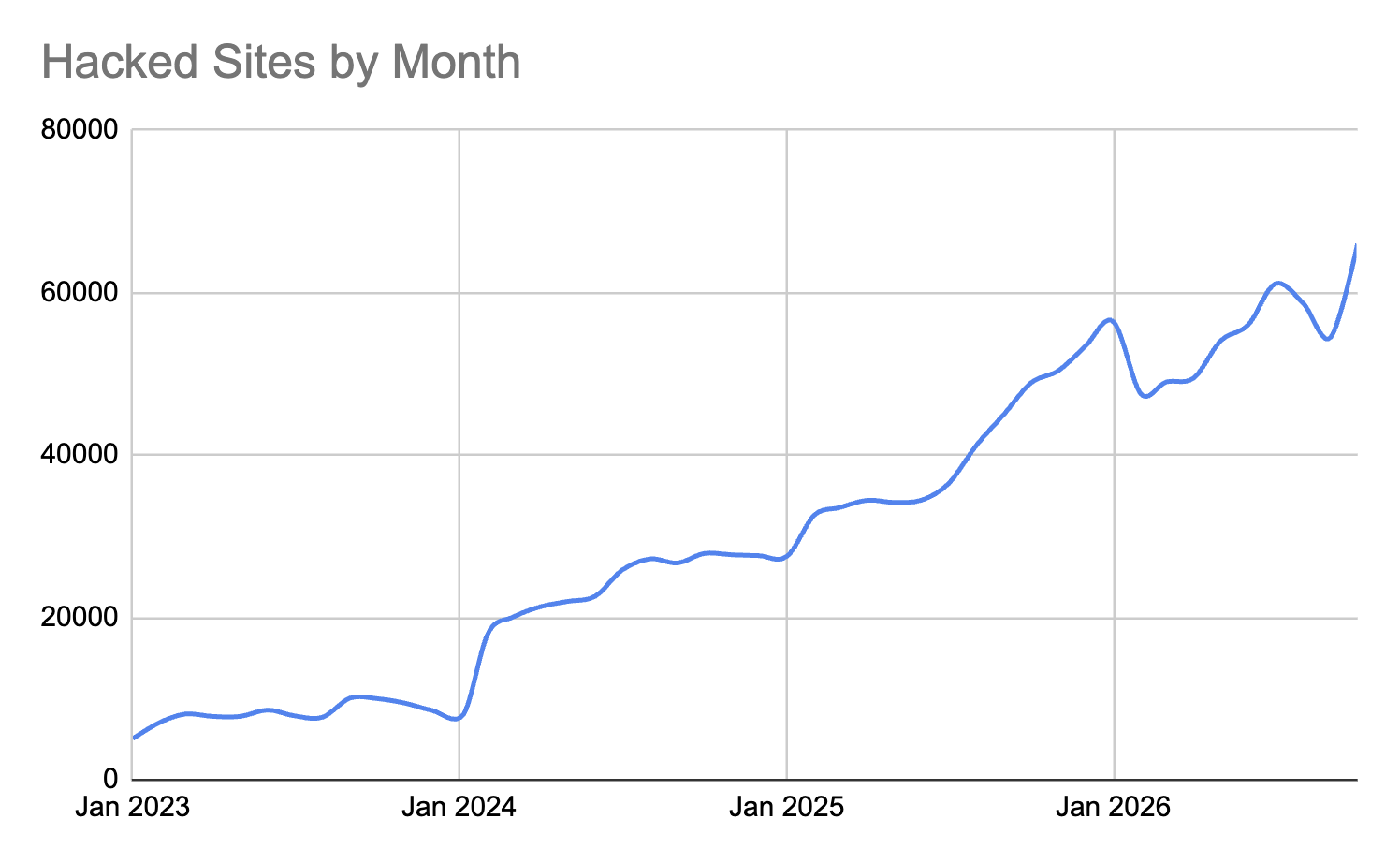
The threat to websites has grown more than fivefold
Our own ThreatView data shows how much the threat to websites has grown. ThreatView recorded 10,005 hacked websites in October 2023, 27,884 in October 2024, 48,890 in October 2025 and 66,012 in October 2026.
|
Assume your business is being probed right now
If an attacker can break into a business like 1Password, it highlights the technical proficiency/skill of the criminals targeting businesses for their data. Perhaps you may consider that you don’t hold data as valuable as 1Password, BUT your customer transaction data is extremely valuable in the wrong hands. You need to assume that your business is being probed by cyber criminals looking for an exploitable vulnerability, trying to break in.
What to do now
- Review 1Password's guidance.
- Expect phishing. Names and email addresses were taken, so be wary of emails that look like they come from 1Password. Open the app yourself rather than following a link.
- List every person, app, plugin, agency and AI tool that can reach your store admin, payment accounts, hosting, domain, email and code.
- Remove access that nobody has used in the last 30 days, and any key given to a supplier for a project that has finished.
- Give each person and tool its own account with only the access it needs. Never share an admin login.
- Use multi-factor authentication on every admin account, ideally hardware security keys rather than SMS codes.
- Move passwords and API keys out of chat tools, shared documents and notes, and into your password vault.
There's no substitute for good security
At a minimum for an eCommerce website, that includes multi-factor authentication on all admin accounts, quick patching, an actively managed web application firewall, full file integrity monitoring (PCI DSS requirement 11.5.2), malware monitoring across your file system and database, and monitoring of every script and asset on your checkout.
While ThreatView Advanced provides some of the most comprehensive security monitoring and incident response capabilities in the industry, it needs to be combined with good cyber hygiene.
Keep safe and secure.
Best regards,
Benjamin Hosack
Founder
Turaco Labs
www.turacolabs.com
|
|
|
Turaco Labs
2 Old Bath Road, Newbury, Berkshire, RG14 1QL, United Kingdom
|
|
|
|
|



 Hello, my name is Ankit Sahu. I'm a 25 year old self-employed Pirate from the Chhindwara.